
Wordforge
Build words from one shared letter pool, either from a picture or from several open word goals.
Wordforge contains two active production formats. Picture spelling shows one image and asks for its exact word from Levels 1-15. Open word finding asks for several distinct accepted words from the same letter pool from Levels 11-85. Levels 11-15 contain both formats, so the child can move from one known target to flexible word finding. Every reviewed example preserves the production letter pool and answer contract. The guide never substitutes a hand-written word or fallback puzzle.
- 2 active formats with a real overlap
- Picture spelling appears at Levels 1-15. Open word finding begins at Level 11 and continues through Level 85, so both formats can appear during Levels 11-15.
- Every word must fit the visible letters
- A submitted word can use only the tiles in the reviewed pool, including the exact number of repeated letters. Open rounds also check that the word is accepted, distinct, and long enough for an unfinished goal.
- Feedback matches the format
- A missed picture word reveals its exact spelling. A completed open round keeps the words the child found and can show other formable words from that same pool.
- Level range
- Levels 1-85 · Preschool through Advanced Challenge
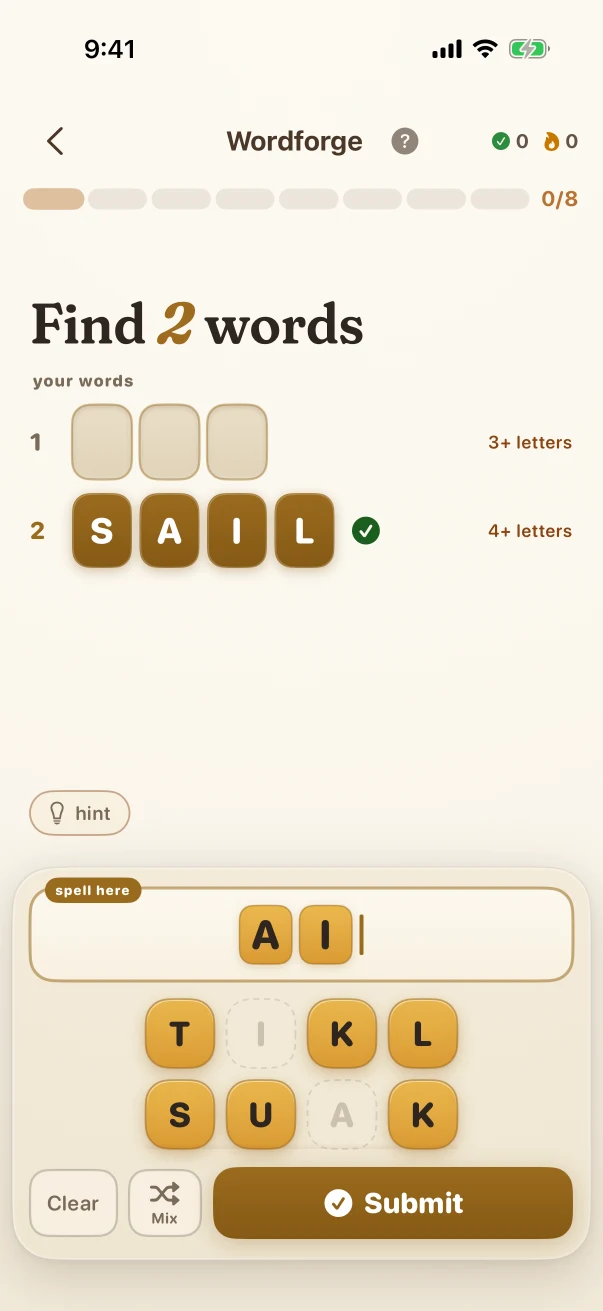
See one Level 11 open-word round in progress
This reviewed trial uses the exact A, I, K, K, L, S, T, U pool selected by production. It opens on the active game with one accepted word filled; switch to the recap to see what appears only after the child finishes or gives up.
- 1
Read the two goals
One slot needs a distinct accepted word of at least three letters; the other needs one of at least four letters.
- 2
Continue from one accepted word
The active state shows one completed goal and the next word being assembled from the same visible tiles. Either K can be used at most twice; every other letter is available once.
- 3
Open the recap only at the end
After a finish or give-up, the recap separates the words the child found from other words that were possible. Tapping a word with the meaning cue opens its definition.
This example stays the same on the website so you can compare it. The app creates new problems during play.
Both production formats, each compared at an exact reviewed level
Switch between the two real formats. Picture spelling is the short Preschool-to-Grade-2 support format; the substantial later example is open word finding. Every example preserves the native letter pool, target count, word-length goals, accepted-answer contract, and app screenshot.
Open word finding
Use one letter pool to build several distinct accepted words that satisfy the unfinished word-length goals.
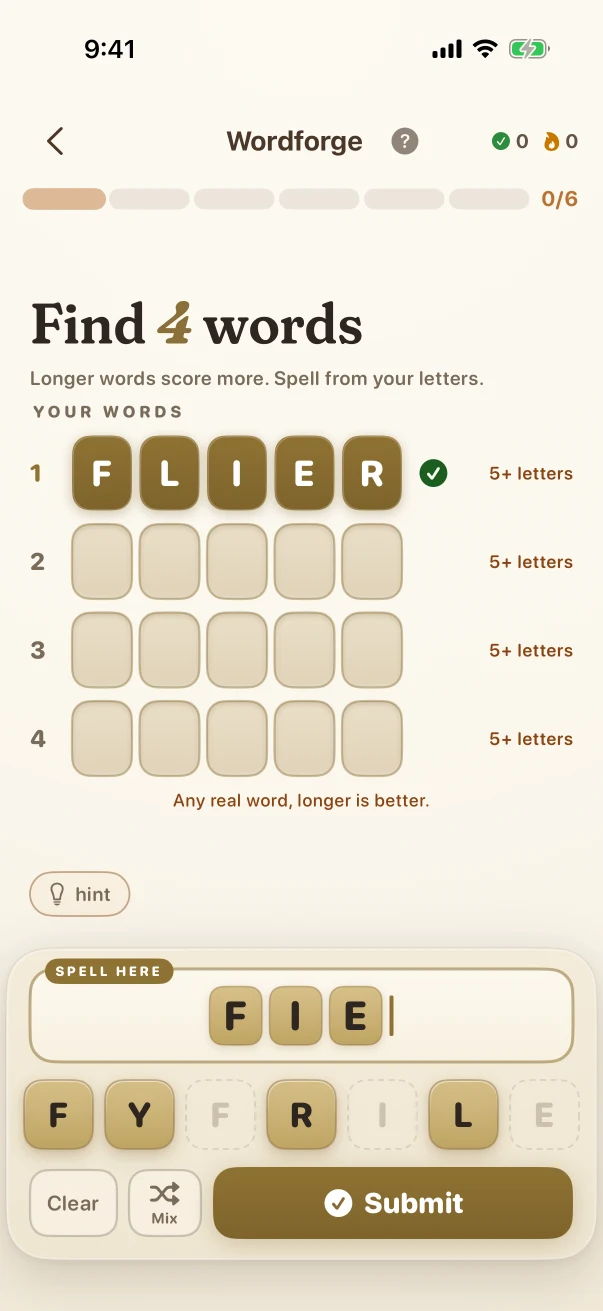
The Level 11 round asks for two distinct words meeting 3+ and 4+ goals and ends with a recap of found and other formable words. The substantial later example is Level 60: four different words of at least five letters must come from E, F, F, I, L, R, and Y, with FIERY already accepted while another word is being assembled. This changes simultaneous goals, minimum lengths, lexical search, and repeated-letter reasoning, not only word size.
Open word finding · Later challenge · Level 60 The numbered or highlighted items show the child's response so far; the task is still in progress.
Open word finding · Grade 11 · Level 60 of 85
- What the child is solving
- Find 4 words
- What counts as correct
- Use one letter pool to build several distinct accepted words that satisfy the unfinished word-length goals.
The numbered or highlighted items show the child's response so far; the task is still in progress.
A wrong tile order reveals the exact pictured word
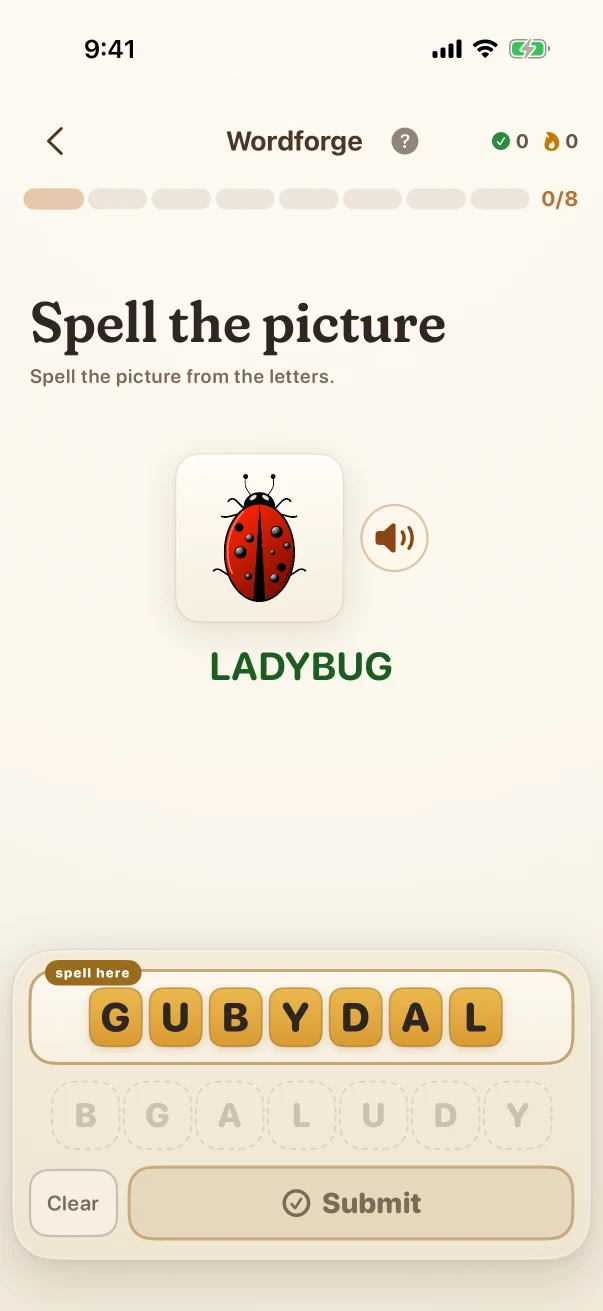
This Level 15 LADYBUG trial keeps the same picture and seven production tiles from the partial response through the correction screen.
- 1
Identify the pictured target
The image names one exact answer: LADYBUG. All seven required letters are present once in the pool.
- 2
Check the assembled order
The reviewed attempt arranges the same letters as GUBYDAL. It uses the right inventory but does not spell the pictured word.
- 3
Reveal the accepted spelling
The native feedback preserves the attempt, marks the miss, and shows LADYBUG so the child can compare the letter order directly.
What genuinely changes across the full level path
The comparisons add new rules, operations, representations, interactions, and reasoning steps. Larger numbers or longer item lists alone are not treated as proof that a challenge is harder.
Spell one pictured three-letter word
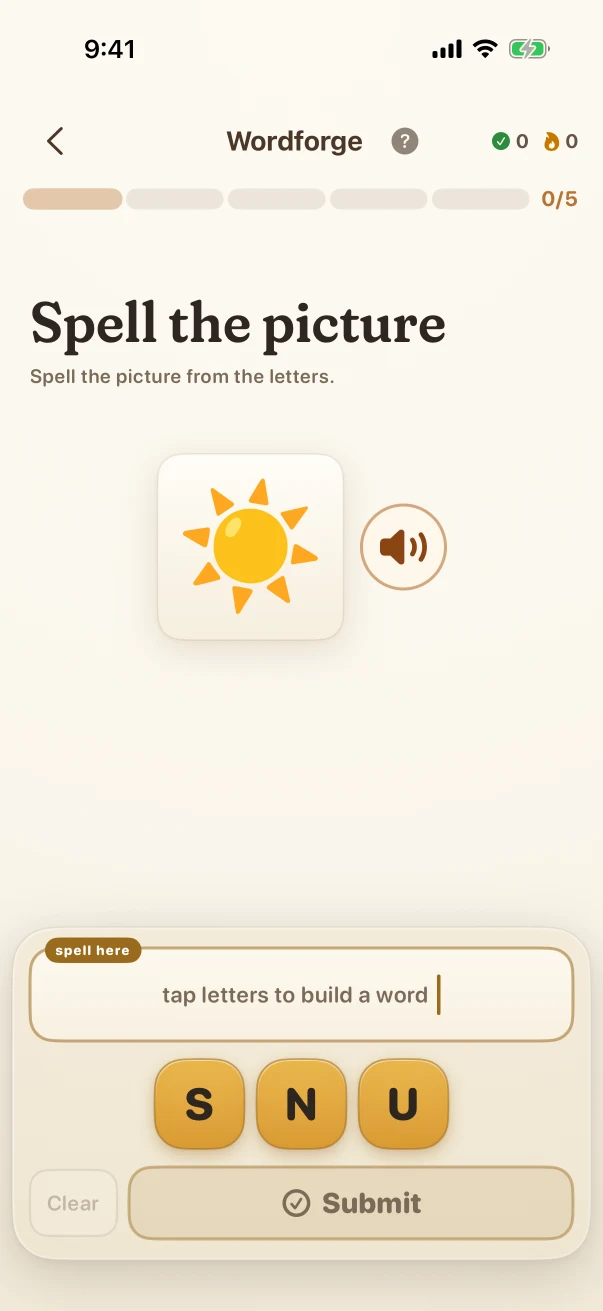
At Level 1, the child sees a sun picture and arranges S, U, and N into the one accepted target: SUN.
Move into open word finding
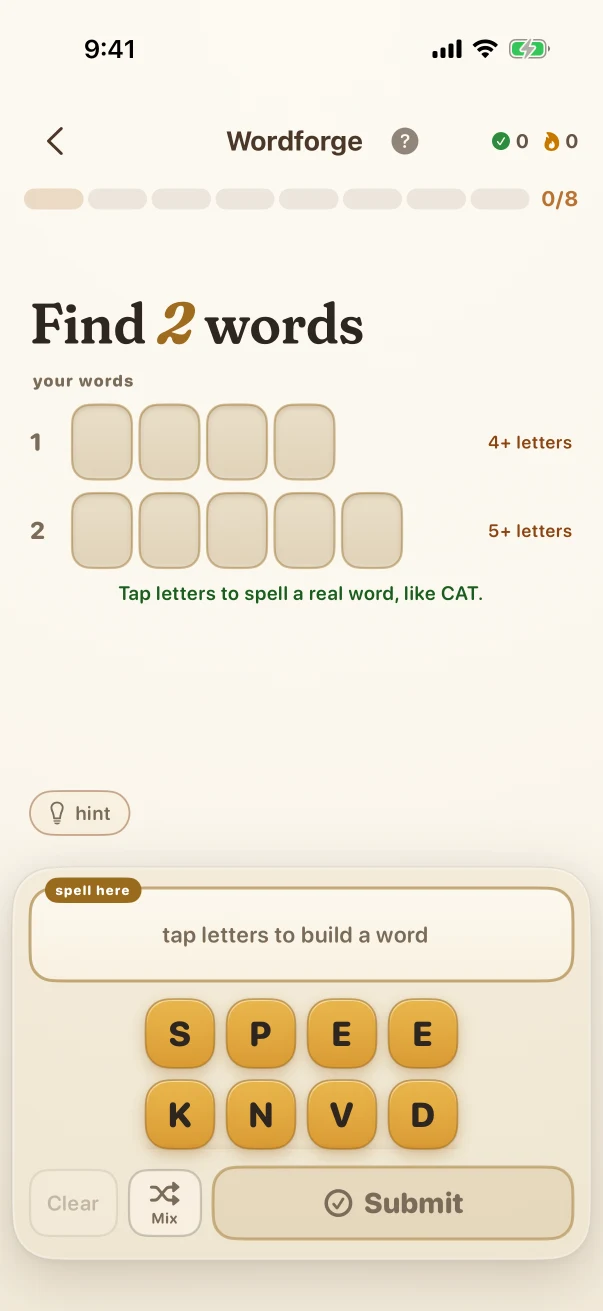
At Level 16, no picture names one answer. The eight-letter pool supports several words, while the round asks for two distinct entries meeting 4+ and 5+ letter goals.
Maintain several same-length answers
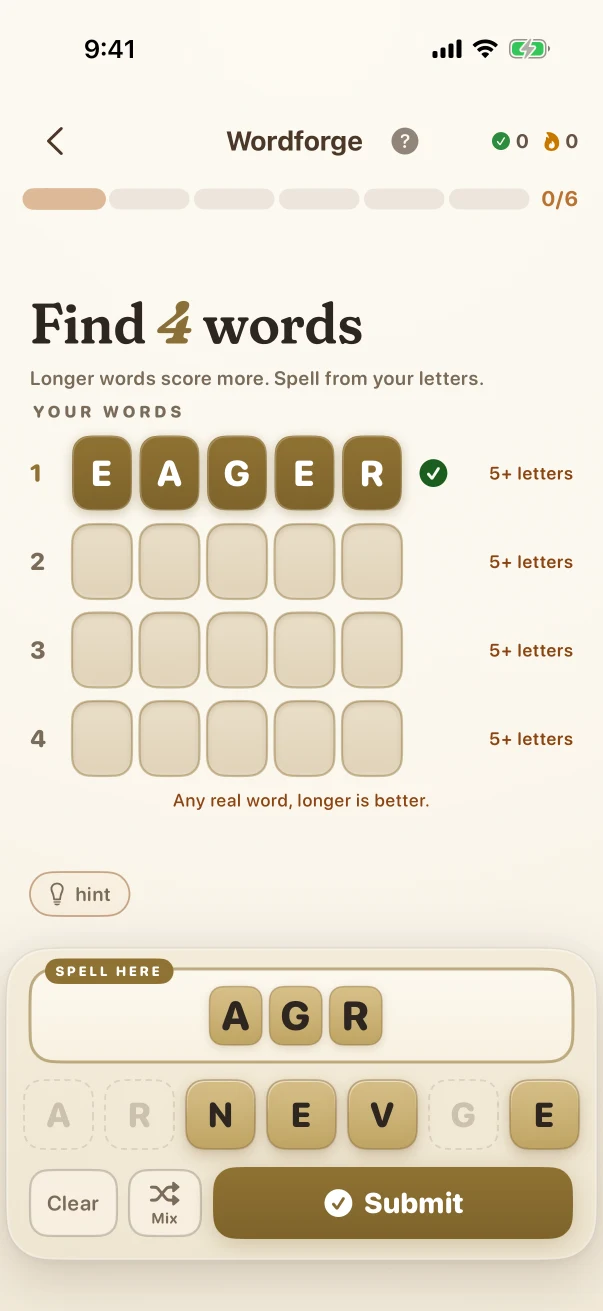
At Level 46, the round asks for four different five-letter words from A, E, E, G, N, R, and V. AGREE is already accepted while ANG is still being assembled.
Satisfy four Grade 11 word goals
At Level 60, E, F, F, I, L, R, and Y must supply four distinct accepted words of at least five letters. The difficulty comes from lexical search, repeated-letter limits, and several simultaneous goals.
What the child is practising in the visible task
These are bounded practice goals tied to the actions shown above, not promises that one game replaces teaching or proves mastery.
Track a fixed letter inventory
The child must notice which letters are available and whether a repeated letter can be used once or twice.
Shift from recall to flexible retrieval
The picture format retrieves one known spelling. The open format searches the same pool for several different accepted words.
Revise from visible outcomes
The picture correction supplies the exact target; the open-round recap separates found words from other words that could be formed.
Fixed website examples, fresh app practice
The iPhone screenshots in this guide show reviewed examples checked against the app's current problem and answer rules. Use the controls to compare exact app states; the screenshots stay fixed so families can inspect them. At launch, the app will create new practice at the child's own level. Viewing this guide does not change app progress or earn anything toward a Screen Time unlock.
iPhone app screenshots
Use the controls to compare fixed problem and mistake or explanation screenshots. Viewing them does not change app progress or award access points.
Full Braincove app at launch
This website guide keeps eight reviewed English app states fixed so families can inspect exact examples. In the app, Wordforge generates fresh content for the child's level and available content locale. Picture spelling selects one reviewed target through Level 15. Open word finding begins at Level 11 and changes the letter pool, number of required words, minimum lengths, repeated-letter constraints, and set of accepted words. Core practice can continue through a temporary connection gap; family sync, Daily, homework, and cross-device updates still need connectivity.
Get the app launch email